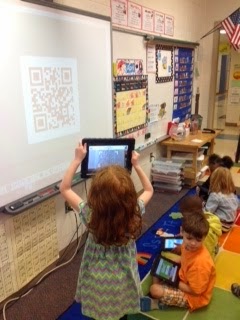
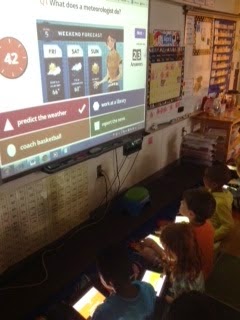
This morning we finally embraced BYOD in our kindergarten classroom! The kids have been using their devices in small groups, but we have not attempted any whole group activities yet. Although we only have 4 students with their own device, we were able to buddy up and supplement with our school iPads. First we used a QR code to take us to Kahoot! We then completed a Kahoot that explored weather concepts. This was great practice for our science assessment we took later on. It also gave me a quick snapshot about one topic I needed to touch on again before the assessment. My kids LOVED reviewing this way and it only took my 10 minutes to make the questions. Through my exploration of the site I learned you can browse other teacher created activities and found 2 more we will do next week (one on math facts and one on blends). I highly recommend searching the site (you can search by grade or content)! #evenkindergartencandoit!
Showing posts with label QR Codes. Show all posts
Thursday, April 9, 2015
QR Codes and Kahoot in Kindergarten
Wednesday, April 8, 2015
I Want to be Like Mr. B!
I was inspired by the fantastic Mr. B. when I saw he was now creating his quizzes online for the students to complete. I am all about finding ways to minimize the paperwork and save time so I have more time to find more resources for my teaching. First, I created the quiz using Google Forms, then I created a QR code for them to use to access the quiz. We ran through a few kinks [students hitting submit too early, etc.] but I'm positive the next time around will be smooth sailing!
Thanks Mr. B :)
Thanks Mr. B :)
Friday, March 27, 2015
Balanced Math Equations with Story Kit and QR Codes
In Math we have been working on "Balanced Math Equations" and understanding the true meaning of the "=" sign. We brought in digital learning by doing 2 different activities relating to this concept. The first activity involved having the students use the "StoryKit" app to create a "book" on Balanced Equations.( A big shout out to Mrs. Delia for teaching us this!) The students learned how to create a title page and then had to create at least 2 other pages in which they had to write equations that were balanced and prove how they knew they were balanced.
After doing this activity, the students were asked to take a true/false quiz that I created using QR codes. The students scanned the QR codes using the QuickScan app. They had an answer sheet to record on. An example of a question: 3 + 5 = 6 + 1 is a balanced equation. The students then had to circle true or false on their answer sheet.
We had a great time using our devices to enhance our learning, and I am excited to create more lessons!
After doing this activity, the students were asked to take a true/false quiz that I created using QR codes. The students scanned the QR codes using the QuickScan app. They had an answer sheet to record on. An example of a question: 3 + 5 = 6 + 1 is a balanced equation. The students then had to circle true or false on their answer sheet.
We had a great time using our devices to enhance our learning, and I am excited to create more lessons!
Friday, March 20, 2015
Pettey's Map Scavenger Hunters with QR Codes
Ms. Pettey and Mrs. D'Elia collaborated to create an activity where Ms. Pettey's 1st graders put their map skills to test using the iPads and QR codes. They scanned QR codes using an app called Quick Scan which gave them questions to answer. (Thank you, Mrs. Bouchard for showing us the cool web tool http://www.classtools.net/QR/ which allowed Mrs. D'Elia and Ms. Pettey to create the questions!) The students referenced different maps using links on our Student Links page to find the answers. The students had a great time reading maps and map symbols, collaborating and being 21st Century learners!
Labels:
1st Grade,
collaboration,
fun,
map skills,
Ms. Pettey,
QR Codes
Monday, March 9, 2015
QR Codes and Padlet Fun in Miss McCommons' 2nd grade class.
Today we used QR Codes and Padlet to start our track in day off on the right foot!! We had so much fun. First we scanned a QR code to get us to our morning work! It showed up right on our devices so we could have the work right in front of us. Then after we finished our morning work we shared our track out adventures via Padlet. Padlet is an amazing online collaboration tool that allows multiple users to post their thoughts to a collective online bulletin board. This way we could all see the amazing things that each person did during track out! WE LOVE BYOD!!
Click the link below to see our awesome padlet.
What did you do over trackout? Padlet
Click the link below to see our awesome padlet.
What did you do over trackout? Padlet
Thursday, February 5, 2015
Webquest
In class today we learned about air pressure by using a webquest. Students scanned the website using a QR code and then researched the webpage to answer the questions and learn about air pressure.
Subscribe to:
Posts (Atom)


